
On Saturday, May 9, it’s that time again. Global Big Day will be held worldwide. An international day, organized by Cornell Ornithology Lab, on which thousands of people go out into gardens and nature reserves to search for land and water birds to count them. This takes a snapshot of bird diversity and density around the world with everyone active on the same day. All counting data is entered on the eBird website, www.ebird.org, creating a massive database of bird diversity.
In addition to the semi-scientific data collected, the day is primarily intended to get people into nature, to go for walks, look for birds, and above all, to observe. Alone, in a group, with family, or with friends.
On all three islands Aruba, Bonaire and Curaçao, there are volunteers participating in Global Big Day by heading out into the field to count birds in the wild. Additionally, people are encouraged to count in their gardens. And that only takes fifteen minutes, from the comfort of a chair in the garden or on the porch. To count birds, you can easily use the eBird app, which can be downloaded from the well-known app stores and also from the website www.ebird.org. See the instruction sequence below for the step-by-step process of creating an account, setting it up, and creating your first checklist.
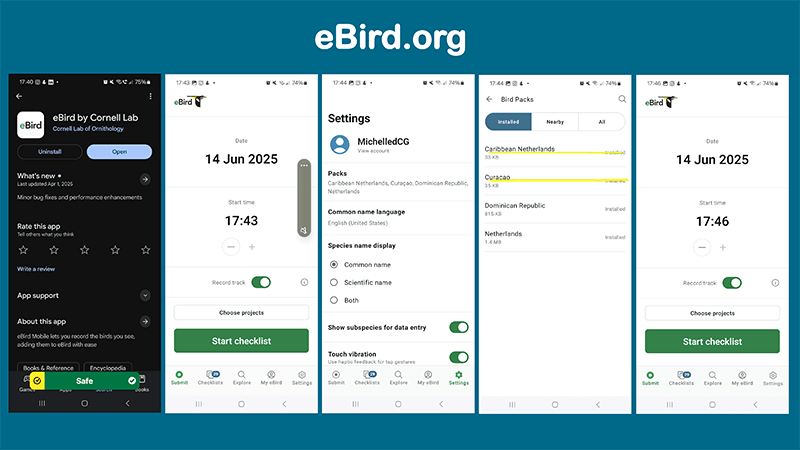
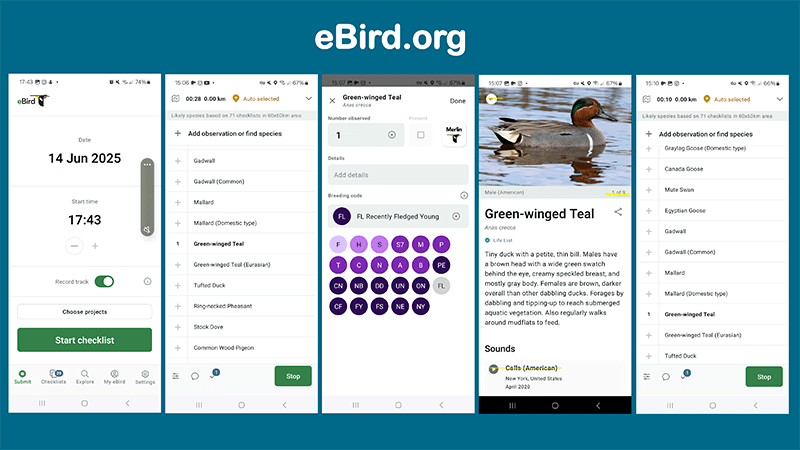
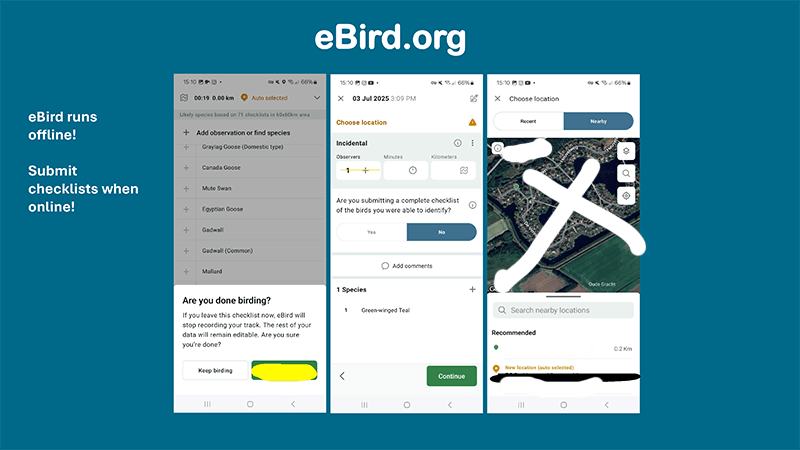
Create an account and you can immediately start creating counting lists with your phone. Are you counting birds in your garden? Then stand or sit in a strategic spot in the garden and wait 5 minutes before you start counting. Turn on the app and start a checklist. Count all the bird species you see and the number of birds of each species for about 15 minutes. When you are finished, stop the checklist with the green button (see photos of the app in the instruction illustration), select a location, indicate that you are submitting a complete checklist, and submit the checklist immediately if you have data on your phone. If you do not, you can also return to your list later and submit it when you have Wi-Fi. There are two counting methods in eBird that apply to counting on Global Big Day. You can count stationary, that is, from one (1) spot, but you can also record a track, and the app will keep track of exactly which route you walked, for example when counting in nature or in a large garden. Even then, it is important to count all the birds you see by species and the number of birds per species. This provides very valuable information about bird density and diversity in certain areas.
For your convenience, we have created a special overview with photos of the most common bird species you can find in the garden to help with identification. You can also use them to count by hand and later create a checklist with your account on eBird. Download the overview here:
If you are having trouble identifying a bird species, try taking a photo and sending it to us, or describe the animal in an email or message on our Facebook page Bird Watching Curaçao or on Caribbean Footprint or to info@caribbeanfootprint.com. Are you joining in too!?

 Bird Watching Curaçao - HOME